
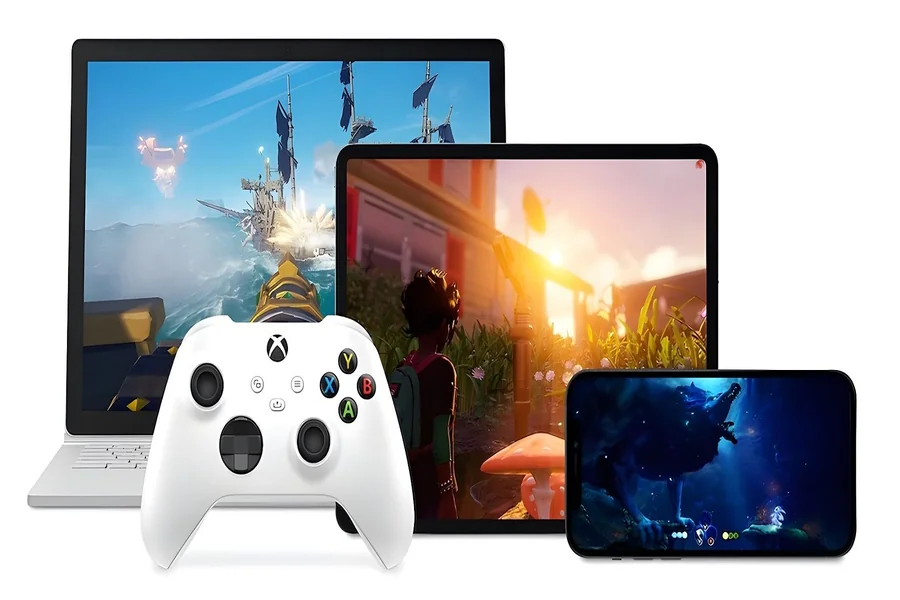
Your laptop handles work perfectly well. Your television has a great screen. Your older desktop still covers everyday tasks. Running a demanding new release at high settings asks for a very different level of hardware.
Cloud gaming approaches that problem from the infrastructure side. The game runs on remote GPU servers, while your device receives a live video stream and sends your controls back. A lightweight laptop, phone, tablet, smart TV, or handheld can therefore provide access to games that would usually require a dedicated gaming machine.
Choosing between the leading platforms takes more than checking the maximum advertised resolution. Server proximity, latency, device support, membership conditions, catalogue size, and video compression all shape the experience.
The top 3 cloud gaming services covered here are:
- NVIDIA GeForce NOW
- Xbox Cloud Gaming
- Boosteroid
Each one approaches cloud gaming from a different direction. GeForce NOW focuses heavily on premium PC streaming performance. Xbox Cloud Gaming connects cloud play with the wider Xbox service family. Boosteroid applies its distributed GPU infrastructure across Europe, North America, and South America.
Key Takeaways
- GeForce NOW offers advanced visual options, high frame rates, and thousands of supported games.
- Xbox Cloud Gaming gives players access to hundreds of console games across phones, computers, consoles, televisions, and other supported devices.
- Boosteroid supports more than 2,000 titles and serves over 8 million users through servers deployed across 29 data centres.
- Your distance from the service infrastructure can matter as much as resolution or frame rate.
- AV1 support can improve image quality and streaming efficiency on compatible devices.
How Cloud Gaming Works
A cloud gaming session begins inside a remote data centre. The service assigns computing capacity to the player, launches the game on its own GPU hardware, and streams the resulting picture and sound over the internet.
Every button press travels in the opposite direction. When you move a character, turn the camera, or press the accelerator, that input reaches the remote server. The game processes it and sends the next frame back to your screen.
This cycle happens repeatedly during every second of play. A stable connection keeps the movement responsive and the image clear. An unstable route can cause visible compression, delayed inputs, audio problems, or sudden changes in resolution.
For a comfortable session, a player generally needs:
- A stable broadband connection
- A device supported by the chosen service
- A compatible controller, keyboard, or mouse
- Reasonable proximity to the service’s infrastructure
- A membership that covers the preferred streaming quality
Raw download speed tells only part of the story. Latency measures how quickly data completes the journey between the player and the server. Connection consistency also matters because cloud gaming sends a continuous stream of visual information rather than downloading a file once.
A 100 Mbps connection with unstable routing may feel worse than a steady 50 Mbps connection connected to a nearby data centre.
What Separates the Leading Cloud Gaming Platforms
Cloud gaming services often use similar language. They promise access from multiple devices, high-quality graphics, and quick entry into games. The differences become clearer when you look at how each service delivers those results.
Streaming performance
Resolution and frame rate are the most visible specifications. Codec support, bitrate, input delay, and frame consistency often have an equally strong effect during actual play.
A fast action game exposes delay quickly. A slower strategy game may remain comfortable under the same network conditions.
Available games
A large number looks attractive, though the composition of the catalogue matters too. Some players follow new blockbuster releases. Others spend years with competitive games, simulators, strategy titles, or smaller independent projects.
Checking the specific games you plan to play remains more useful than comparing catalogue totals alone.
Supported devices
Cloud gaming can run on computers, phones, tablets, smart TVs, consoles, handhelds, and selected virtual reality devices. Each provider covers a different combination, and some advanced streaming features work only on particular hardware.
Regional infrastructure
A server located closer to the player usually reduces the distance that every control input and video frame must travel. Network routing can still add complications, though geographic coverage gives the service a stronger starting point.
Membership conditions
Plans may differ in session length, waiting times, resolution, frame rate, server priority, and access to premium hardware. Reading the plan details helps prevent surprises after subscribing.
1. GeForce NOW and High-End Streaming
GeForce NOW is NVIDIA’s cloud gaming service, built around remote GeForce RTX hardware and a clear focus on visual quality, frame rate, and response time. It supports Windows computers, Macs, Chromebooks, phones, tablets, gaming handhelds, selected smart TVs, and other compatible screens. Depending on the device, players can connect through a dedicated application or a supported browser.
The remote server handles the demanding graphics work, while the local device decodes the video stream and sends control inputs back. That makes GeForce NOW useful across different setups. A player can use a high-refresh-rate monitor at home, continue on a laptop while travelling, or open a shorter session on a handheld.
Streaming performance
GeForce NOW’s premium memberships offer the service’s highest visual settings. On compatible equipment, Ultimate members can stream at up to 5K and 120 frames per second, while competitive modes can reach 360 frames per second at 1080p.
The exact result depends on the player’s membership, display, application, internet connection, and local decoding hardware. A 60 Hz screen cannot show the full benefit of a 120 FPS or 360 FPS stream, while higher resolutions require more bandwidth and stronger decoding support.
Premium features can include:
- Ray tracing through remote RTX hardware
- DLSS in compatible games
- HDR on supported displays
- Ultrawide resolution options
- High-refresh-rate streaming
- NVIDIA Reflex support in selected titles
These options allow players to prioritise different things. Someone playing a competitive shooter may prefer frame rate and response time. A player opening a detailed single-player game may choose higher resolution, HDR, and stronger image quality.
Game selection and device access
GeForce NOW provides access to thousands of supported PC games. The catalogue covers major releases, long-running multiplayer games, strategy titles, simulators, and independent projects.
The total catalogue size gives useful context, though specific availability matters more for each player. Checking the games you already play, plus the releases you expect to try next, gives a clearer picture of the service’s value.
Device support also affects the experience. Keyboard and mouse controls fit naturally on a desktop or laptop, while controller-friendly games work well on televisions and handheld devices. Some advanced streaming features remain limited to particular applications and hardware.
Connection and regional coverage
GeForce NOW requires a stable connection and low latency to one of its service locations. Higher resolutions and frame rates need more bandwidth, while competitive games benefit from especially low response times.
Ethernet usually provides the most consistent connection. Strong 5 GHz or 6 GHz Wi-Fi can also work well when the router is nearby and network interference is limited. Packet loss and sudden latency spikes can affect image clarity and control response, even when a speed test shows ample download capacity.
NVIDIA offers GeForce NOW directly in some markets and works with regional partners in others. Memberships, hardware, prices, and available features can therefore vary by country. Running the service’s network test before subscribing gives players a clearer sense of expected latency from their location.
GeForce NOW suits players who care about advanced graphical settings, high frame rates, and access across several device types. Its strongest features make the most sense on fast connections and displays capable of showing the service’s higher performance levels.
2. Xbox Cloud Gaming and Connected Console Access
Xbox Cloud Gaming places remote console gaming across screens people already use. Its main appeal comes from quick access, broad device support, and close integration with Xbox accounts, cloud saves, achievements, social features, and Game Pass memberships.
The service works on Windows computers, Android phones and tablets, iPhones, iPads, Xbox consoles, selected smart TVs, Fire TV devices, handhelds, and Meta Quest headsets. The game runs on Microsoft’s remote hardware, while the player’s device displays the stream and sends controller, keyboard, mouse, or touch inputs where supported.
Quick access to games
Xbox Cloud Gaming gives eligible Game Pass members access to hundreds of cloud-enabled titles. The catalogue includes major releases, independent projects, family games, racing titles, role-playing games, sports games, and multiplayer experiences.
Cloud access makes exploring that catalogue easier. A player can open an unfamiliar game and spend time with it before deciding whether it deserves a local installation. This is useful on consoles and computers with limited storage, where large downloads can take up much of the available space.
The exact catalogue changes over time and can vary by region, plan, device, and game. Checking the titles you expect to play remains the most practical step before subscribing.
Playing across different screens
Xbox Cloud Gaming uses the same account structure as the wider Xbox service. Cloud saves allow progress to move between supported devices, so a player can begin on a television, continue on a laptop, and open a shorter session on a phone.
Different devices support different control methods:
- Standard Xbox and compatible Bluetooth controllers
- Wired controllers on supported computers
- Keyboard and mouse support in selected games
- Touch controls in selected mobile titles
- Mobile controller grips and dedicated handheld controls
Touch controls can make an unplanned mobile session possible, while a physical controller usually offers greater precision for games designed around analogue sticks, triggers, and several simultaneous inputs.
Streaming quality and connection needs
Xbox Cloud Gaming adapts the stream to the player’s connection and device. A stable session can provide clear picture quality and responsive controls, while congestion, packet loss, or an unstable wireless signal may cause compression, reduced sharpness, or delayed inputs.
The effect of latency varies by genre. Turn-based games, slower adventures, and many role-playing games can remain comfortable under moderate delay. Competitive shooters, rhythm games, fighting games, and racing titles reveal connection problems much faster.
A wired connection gives the strongest starting point. Good 5 GHz or 6 GHz Wi-Fi can also perform well when the router is nearby and the network is not overloaded.
Regional coverage and the best fit
Xbox Cloud Gaming is available in a growing list of supported countries, though general Xbox availability and cloud access do not always match. Device support, membership options, and streaming features can also vary between markets.
The service suits players who already use Xbox accounts or Game Pass, value a large subscription catalogue, and want to move between televisions, computers, consoles, and mobile devices.
Its strength comes from how naturally cloud gaming fits into the wider Xbox experience. Players can open a game on an available screen, access existing progress, and continue within the same account structure without changing how they organise their gaming life.
3. Boosteroid and Its Distributed GPU Infrastructure
Boosteroid approaches cloud gaming as part of an infrastructure operation.
Boosteroid is a global technology and infrastructure company building and operating large-scale distributed GPU platforms for AI, high-performance computing, and real-time edge workloads. Cloud gaming is one real-time application of that engineering and operational capacity.
The company runs GPU resources that must process demanding workloads and respond quickly across long distances. Cloud gaming provides a visible example of this work because every session depends on fast processing, stable delivery, and close coordination between hardware, software, and network operations.
Boosteroid is the world’s largest independently operated cloud gaming platform. It sits outside the ownership of the major technology groups and competes with their services across geographic reach, user scale, and streaming performance. Official company materials report more than 8 million users across Europe, North America, and South America.
Boosteroid in numbers
The service currently has:
- More than 8 million registered users
- Support for over 2,000 games
- Servers deployed across 29 data centres
- Infrastructure serving Europe, North America, and South America
- Streaming at up to 4K and 120 frames per second
- AV1 support on compatible devices
Boosteroid’s official company page states that players can run more than 2,000 games through the service. Its infrastructure had expanded to 29 data centres across multiple continents by 2026.
How Boosteroid works across three regions
In Europe, Boosteroid operates a distributed network of computing locations that places capacity closer to major population centres. European users are routed to an available location based on their position, network conditions, and current infrastructure capacity.
The same model applies in North America and South America. A user connects to Boosteroid, and the platform assigns the session to suitable regional infrastructure. The game runs remotely, while the video stream reaches the player’s computer, television, phone, tablet, or handheld.
This regional approach reduces the physical distance involved in each interaction. Actual performance still depends on local internet quality and the route used by the player’s provider. Two people in the same city can see different results when their traffic follows different network paths.
South American coverage carries particular significance because cloud gaming performance depends heavily on regional infrastructure. Routing a session across another continent would add considerable delay. Local and regional GPU capacity gives players a more practical route to responsive streaming.
What AV1 brings to Boosteroid
Boosteroid supports the AV1 video codec at bitrates of up to 40 Mbps. AV1 compresses video more efficiently than several older formats, helping the platform preserve detail while using available bandwidth more carefully.
During cloud gaming, the screen can change almost completely from one frame to the next. Grass, smoke, shadows, moving characters, and camera turns create a difficult compression task. Better codec efficiency helps maintain a cleaner picture during these busy scenes.
AV1 requires compatible decoding hardware on the player’s device. Recent GPUs, processors, smart TVs, and mobile chips increasingly include that support. Players using older devices may receive a stream through another supported codec.
Boosteroid suits players who live within reach of its European or American infrastructure, want access to a large game catalogue, and value an independently operated service with substantial experience in distributed GPU computing.
Matching Each Service to the Way You Play
Technical specifications help narrow the choice, though playing habits usually make the final decision easier.
Choose GeForce NOW when visual performance comes first
GeForce NOW deserves consideration when you have a high-refresh-rate display, a fast connection, and an interest in advanced graphical settings.
It is particularly appealing for players who want:
- Up to 5K streaming on supported setups
- Very high frame rates for competitive games
- RTX features and DLSS
- A large selection of PC titles
- Access across computers, handhelds, phones, and televisions
Its premium capabilities make the most sense when your local equipment can display them.
Choose Xbox Cloud Gaming for convenient access across screens
Xbox Cloud Gaming fits naturally into a household that already uses Xbox accounts, Game Pass, or Microsoft gaming services.
It works well for people who want to:
- Browse hundreds of games through a subscription
- Start playing quickly
- Continue progress on another supported device
- Use a console-style interface
- Play through a phone, computer, television, or Xbox console
The platform places convenience and catalogue access at the centre of the experience.
Choose Boosteroid for broad regional GPU coverage
Boosteroid is a practical choice for users near its infrastructure in Europe, North America, or South America.
It may suit players who value:
- More than 2,000 supported games
- Up to 4K streaming at 120 FPS
- AV1 support on compatible devices
- A service operating across 29 data centres
- An independent cloud gaming company with over 8 million users
- Infrastructure built for cloud gaming, AI, high-performance computing, and real-time processing
Its distributed model makes location an important part of the decision. Running Boosteroid’s connection test can show how your network reaches the available infrastructure.
Test Your Connection Before You Subscribe
Marketing pages describe the best conditions a service can deliver. Your home connection decides which part of that performance reaches your screen.
Start by checking whether the provider has infrastructure or official service coverage in your country. Then run its network test on the same device and connection you plan to use for gaming.
Testing at your usual playing time is useful too. Home and neighbourhood networks can become busier during the evening, creating conditions that a quiet morning test may miss.
Before subscribing, check the following:
- Available data centre or regional coverage
- Measured latency
- Connection stability
- Recommended download speed
- Device compatibility
- Controller or keyboard support
- Maximum resolution on your device
- AV1 decoding support
- Session length and access priority
- Availability of the games you actually plan to play
A month-long membership can also serve as a realistic test. Play several types of games during that period. A turn-based title gives limited information about input delay, while a racing game or fast shooter makes latency easier to notice.
Wi-Fi conditions matter inside the home as well. Distance from the router, walls, interference, and other active devices can affect the stream. Ethernet usually provides the most consistent result. A strong 5 GHz or 6 GHz Wi-Fi connection can also work well when the router is nearby.
Choosing Around Your Connection Devices and Playing Habits
The three services solve different versions of the same problem.
GeForce NOW concentrates on premium PC-style streaming, advanced graphics, and high frame rates. It rewards players who have fast connections and displays capable of showing its upper performance levels.
Xbox Cloud Gaming places hundreds of console games across a wide range of familiar devices. It works especially well for players who value quick access, a subscription catalogue, and continuity within the Xbox service family.
Boosteroid combines its cloud gaming platform with a wider distributed GPU infrastructure business. Its service reaches more than 8 million users across Europe, North America, and South America, with servers deployed across 29 data centres and support for more than 2,000 titles.
The best choice begins close to home. Your location, internet provider, router, preferred screen, and favourite games determine how each platform will feel during an actual session.
Specifications help create a shortlist. A real connection test reveals which service can deliver the experience those specifications promise.
Frequently Asked Questions
What are the top 3 cloud gaming services in 2026?
Three leading options are NVIDIA GeForce NOW, Xbox Cloud Gaming, and Boosteroid. GeForce NOW focuses on premium PC streaming performance. Xbox Cloud Gaming provides subscription-based access to hundreds of console games. Boosteroid serves users across Europe and the Americas through its distributed GPU infrastructure.
Which cloud gaming service supports the most games?
GeForce NOW provides access to more than 4,500 titles across its ready-to-play and Install-to-Play options. Boosteroid supports more than 2,000 games, while Xbox Cloud Gaming offers hundreds of console titles. Catalogue composition and individual game availability remain important parts of the comparison.
Does Boosteroid work in North America?
Yes. Boosteroid serves users in North America through regional GPU infrastructure. Performance depends on the user’s distance from an available data centre, local connection stability, and internet routing.
Does Boosteroid work in South America?
Yes. Boosteroid operates in South America and serves users through infrastructure intended to keep game processing within a practical regional distance. Players should run the service’s network test to check latency from their location.
Does Boosteroid work in Europe?
Yes. Europe is one of Boosteroid’s main operating regions. Its distributed network includes multiple European locations, allowing users to connect to available regional infrastructure.
What does AV1 do in cloud gaming?
AV1 compresses the live game video sent from the remote server to the player. Its efficiency can provide clearer images at a given bitrate or reduce the bandwidth needed for comparable visual quality. The receiving device needs compatible AV1 decoding support.
Do I need a gaming computer for cloud gaming?
Cloud gaming moves the demanding graphics processing to remote hardware. A supported everyday computer, phone, tablet, smart TV, console, or handheld can display the stream and send player inputs. The device still needs enough decoding capacity for the selected resolution and codec.
Can cloud gaming replace a gaming PC or console?
Cloud gaming can serve as a primary way to play when the user has stable internet, low latency, suitable regional coverage, and access to their preferred games. Local hardware remains useful for offline play, highly customised setups, and situations where the connection varies.
