

Data loss can have several unfortunate consequences, which are often caused by accidental deletion, formatting errors, hard disk errors, or system crashes. For most users, file recovery is usually a difficult task.
Although many people consider Windows file recovery a useful tool, its command-line interface can be intimidating. Professional data recovery software, such as MyRecover, can alleviate this difficulty. We tried MyRecover in this article and tested its easy way to recover files in Windows.
Introduction and Main Functions of MyRecover
MyRecover is an effective Windows file recovery software. It offers an opportunity to recover accidentally deleted or lost data on Windows 11, 10, 8, 7, and servers.
Moreover, it offers a variety of robust features and a friendly user interface to ensure a high success rate in various data loss scenarios.
The main functions of MyRecover are:
Simple interface: MyRecover has a simple interface that makes the recovery process more intuitive. Users can easily use the software, start scanning, preview recoverable files, and perform recovery functions.
Supports various data loss scenarios: No matter how you delete your data, whether it is normal or accidental or you need to recover data due to hard disk formatting, system damage, or virus attack, this data recovery software can help you recover your data easily.
Recover more than 200 file types: MyRecover can scan and recover more than 200 file types, including documents, pictures, videos, audio files, and more.
Fast and comprehensive recovery: Use a fast and comprehensive scanning method to thoroughly find deleted or missing files from your storage device. Information is not lost, which increases the likelihood of a successful recovery.
Works with many devices and systems: MyRecover works with various storage devices, such as hard drives, SSD drives, USB drives, memory cards, and others. It supports various file systems, including NTFS, FAT16, FAT32, and ReFS.
Secure: MyRecover takes data integrity and security into account throughout the recovery process. Recovered files will be returned to a safe place without affecting their quality or content.
Recover Deleted Files in Windows 10 With MyRecover
We want to show you how MyRecover works and how you can recover deleted files in Windows 10 in just a few steps. We downloaded MyRecover from the official website and followed the installation instructions for our Windows computer.
Test preparation: For this test, we have selected 4 file formats DOCX, PNG, MP4, and MOV that have been permanently deleted from the computer’s hard drive. Then we want to try to recover it with My Recover. We also tested MyRecover for file format recovery and paper recycling.
Test procedure:
Executed MyRecover on a Windows computer. MyRecover identifies all of your computer’s hard drives as well as external drives connected to the computer. Then we pass the drive where the previously deleted file is stored and click the scan icon.
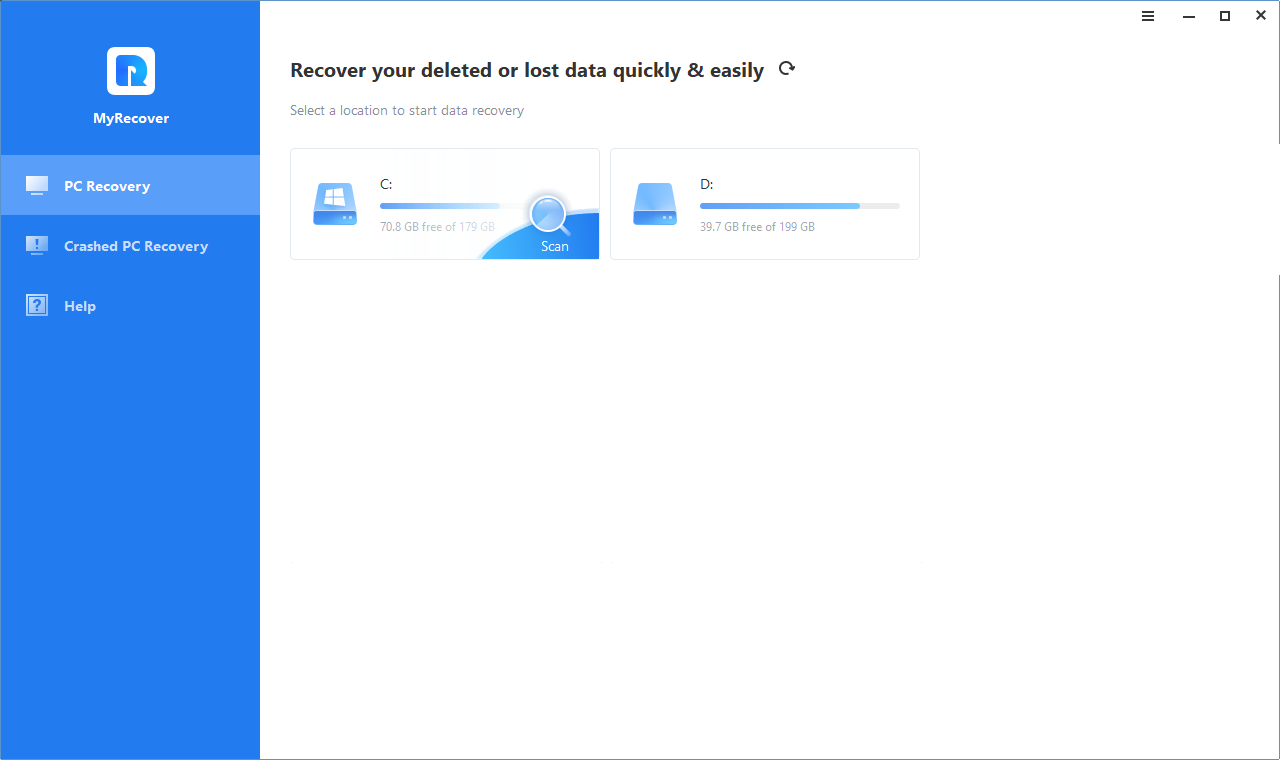
MyRecover then starts a quick scan and deep scan of the selected drive. All deleted and missing files will appear in the list. We can use MyRecover’s filter and preview functions. Just type DOCX in the search box and you will find all deleted DOCX files.

We found the accidentally deleted files (DOCX, PNG, MP4, and MOV files) and clicked “Recover X files”. To avoid data loss, we have selected a new storage location for the files to be restored.
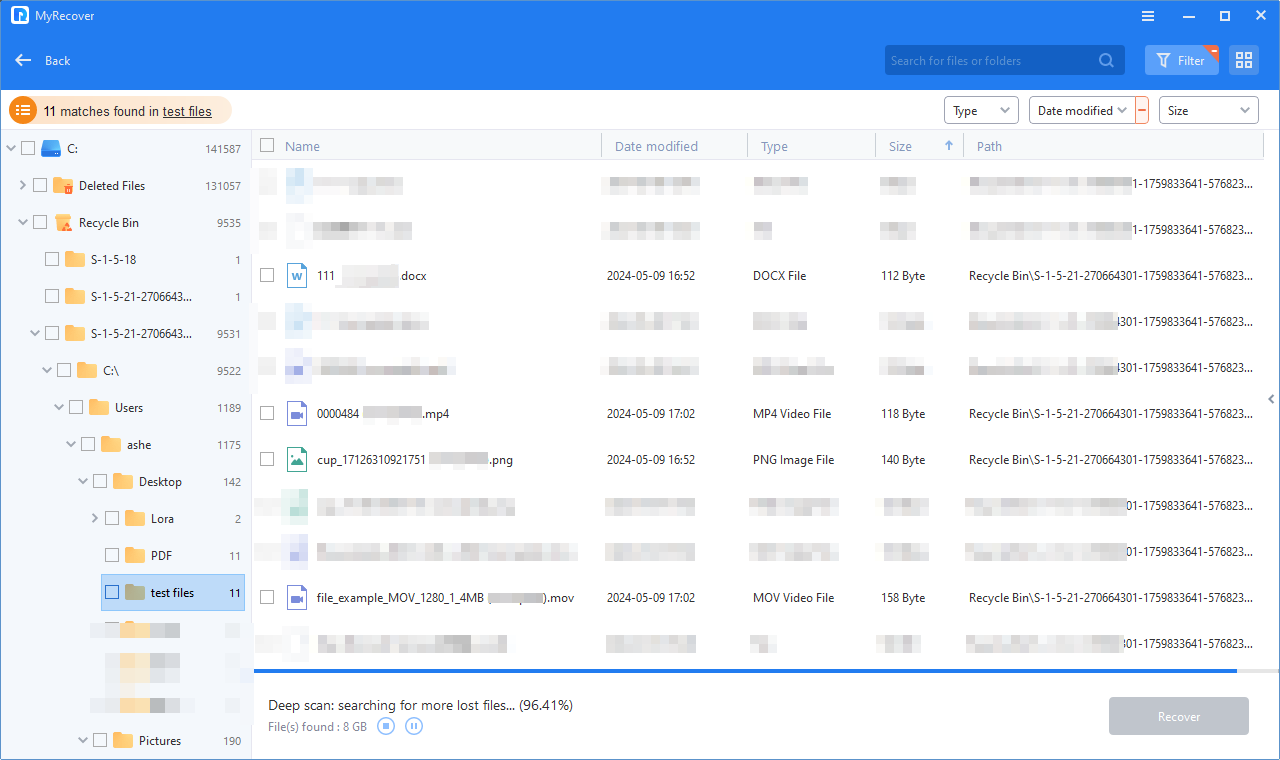
These files will be restored with high speed. When the recovery is complete, we go to the data storage location to check the recovered files. MyRecover can be a reliable tool for Win recovery.
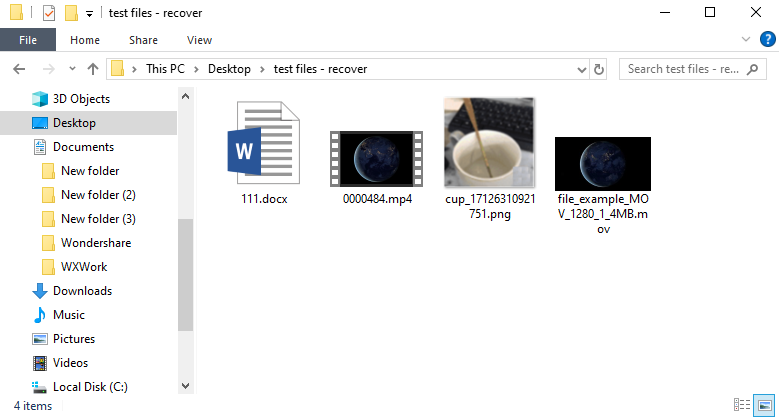
Test results: The scan can be completed within 5 minutes and the recovery rate reaches 95%. Its powerful file recovery function can save you a lot of time. In addition, recovery of recycled paper and disc formats proved to be very effective.
Conclusion
MyRecover is a good choice for beginners and experienced users looking for reliable Windows file recovery software. Thanks to its excellent functions such as filtering, previewing, and deep scanning, it is suitable for various data loss situations, from simple data deletion to more difficult data recovery needs.
